

Amazon Seller Tools: Tools for Every Task, from Product Research to Accounting
Every task in an Amazon business has dedicated tools, from product research, keywords, analytics, inventory and advertising to repricing and accounting. This overview sorts the tools by task and names what the providers themselves write about the tools.
Selling on Amazon involves many tasks: finding products, choosing keywords, calculating profit, restocking, managing ads, adjusting prices and filing VAT returns. Each of these tasks has specialized tools.
This overview sorts the tools by task, in the order in which the tasks come up in day-to-day selling. Many of the tools cover tasks that sellerfox does not, such as product research, repricing or accounting. sellerfox appears only in the sections for tasks that sellerfox covers.
About this overview: sellerfox publishes this overview. We build sellerfox, so sellerfox comes first in each section for a task that sellerfox covers. The other tools follow in alphabetical order within each section. The order is not a ranking. Details on the other providers come from the providers' public product, pricing and help pages, numbered under "Sources" at the end of the article. We do not cite third-party reviews or other providers' prices. sellerfox has no partnership or commission agreement with any of the providers named. Details on sellerfox come from our product documentation. This overview is not an independent review.
Last checked: All details checked on October 30, 2026. Plans and features may change after this date.
What to check when you choose an Amazon seller tool
Six questions help you find a suitable tool for each task. Check each answer on the provider's product, pricing and help pages and, if the provider offers a trial, with your own products.
Tasks: Which tasks should the tool take on? Some providers cover several tasks, others focus on one. Decide which tasks you want to cover, and check for each task whether the provider describes the feature.
Your own data or market data: Some features analyze your own sales from Seller Central, others estimate sales and revenue of other products for product and market research. Before launch you need market data; for products you already sell, you need your own numbers.
Software or service: Some providers deliver software that you operate yourself. Others take steps off your hands, such as reimbursement claims with Amazon or VAT filings. Check who does which step and what access to your data the provider needs for that step.
Pricing model: What does the price depend on: revenue, orders, ad spend, products, documents or a commission on reimbursements? Which features are only in higher plans? Calculate with your business today and with the business you expect in a year.
Team and agency: How many users does the plan include, and can you set permissions per user? If you manage several clients as an agency, check whether you can switch between your clients' accounts.
AI and MCP: An MCP server connects an AI assistant such as Claude or ChatGPT to a tool's data, so you can ask questions in plain language. Check which data the AI assistant may read, whether the AI assistant can change anything, such as bids or listings, and which plan includes access. Learn more in our guide AI for Amazon sellers.
Tasks and tools at a glance
Product research: AMZScout, Helium 10, Jungle Scout, SmartScout
Price and rank history: sellerfox, Keepa
Keywords and listings: sellerfox, Data Dive, SellerApp
Analytics and profit: sellerfox, AMALYTIX, My Real Profit, sellerboard
Inventory, replenishment and reimbursements: Getida, SELLERLOGIC Lost & Found, VentoryOne
Advertising and PPC: BidX, Perpetua, PPC-Butler, Teikametrics
Repricing: Aura, BQool, SELLERLOGIC Repricer
Accounting and tax: Amainvoice, hellotax, Taxdoo
Product research tools
Product research needs market data: estimated sales and revenue of other products, competition and trends. Product research is not part of sellerfox.
AMZScout
AMZScout names finding profitable products on Amazon as the focus. According to the provider, the PRO AI browser extension shows product scores, profit estimates and supplier data on Amazon pages and includes an AI chatbot. The product database generates product ideas, and Product Tracker follows the daily sales and rating changes of individual products.1
Helium 10
On the tools page, Helium 10 groups the tools for Amazon sellers into product research, keyword research, listing optimization, operations, analytics and advertising.2 For product research, the help center names Black Box as the primary tool.3 Xray in the Helium 10 Chrome extension shows, for the products in an Amazon search, details such as brand, price, estimated monthly revenue and Best Seller Rank (BSR); you can open the history of sales, Best Seller Rank (BSR) and review count.4 Detailed comparison: sellerfox vs. Helium 10.
Jungle Scout
According to Jungle Scout, Catalyst is built for new and growing sellers and provides the tools to find, launch and scale products on Amazon.5 For product research, Jungle Scout names Product Database, Opportunity Finder, Product Tracker and Category Trends.6 According to the provider, Product Database is a searchable catalog of Amazon products that you sort by category, estimated sales, revenue and other criteria.7 Detailed comparison: sellerfox vs. Jungle Scout.
SmartScout
SmartScout describes a database of Amazon products for product research. According to the provider, you can remove Amazon's own listings from a search, and for a product SmartScout shows revenue, competition, seller count, a traffic graph and trends.8 You search brands by revenue, product count, growth rate and other criteria. For third-party sellers on Amazon, SmartScout shows estimated monthly revenue, the brands the seller carries and catalog size.9
Price and rank history tools
The history of price and Best Seller Rank (BSR) shows how steadily a product sells and how much the price moves. Our guide to the Best Seller Rank (BSR) explains what the rank tells you.
sellerfox
In BSR Explorer, you follow the Best Seller Rank (BSR) of your own products by category and marketplace; sellerfox updates the ranks daily. The BSR history starts with the first measurement after you set up your Workspace; sellerfox cannot load older ranks. sellerfox does not show the price history of other products.
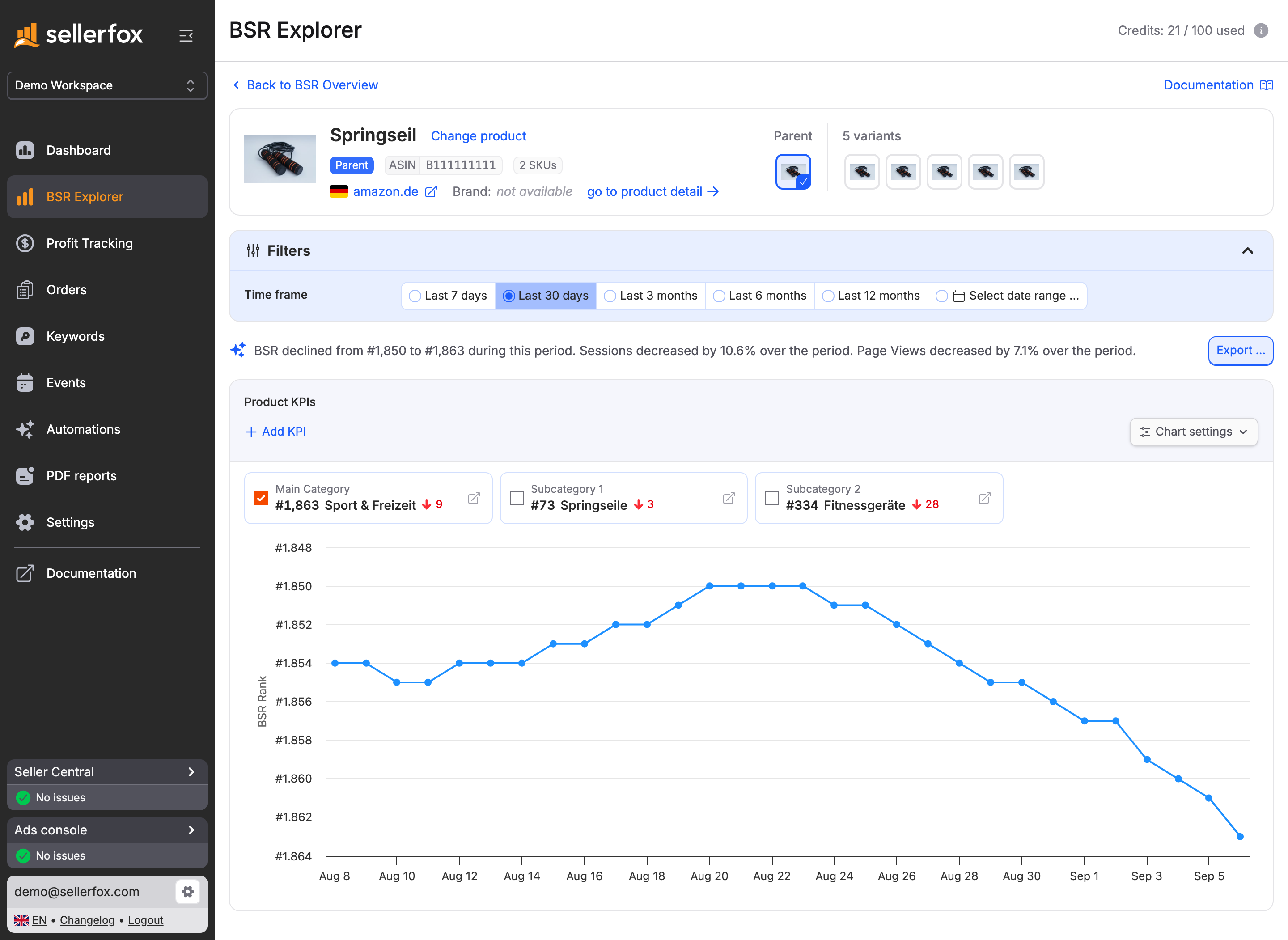 In BSR Explorer, you follow a product's Best Seller Rank (BSR) by category over the selected period.
Keepa
In Keepa's own Chrome Web Store description, Keepa adds price history charts to the product pages of the supported Amazon sites, including amazon.de. With a price watch, Keepa notifies you when a product drops below your target price or is back in stock, and you can compare prices across Amazon marketplaces.10
Keyword and listing tools
Keywords and listings come down to two questions: which search terms do shoppers use to look for your product, and where does your product rank for those terms? On top of that comes keeping track of what changed on your listing. Our guides Amazon SEO and listing optimization on Amazon cover the basics.
sellerfox
Keyword Tracking checks each day where your products appear on the first Amazon results page, recording organic, sponsored and overall positions. sellerfox does not measure deeper results pages. Listing Event Tracking records changes to titles, images or prices as events, and you can show the events on your product charts. You can record your own actions as events too. Keyword research and listing editing are not part of sellerfox.
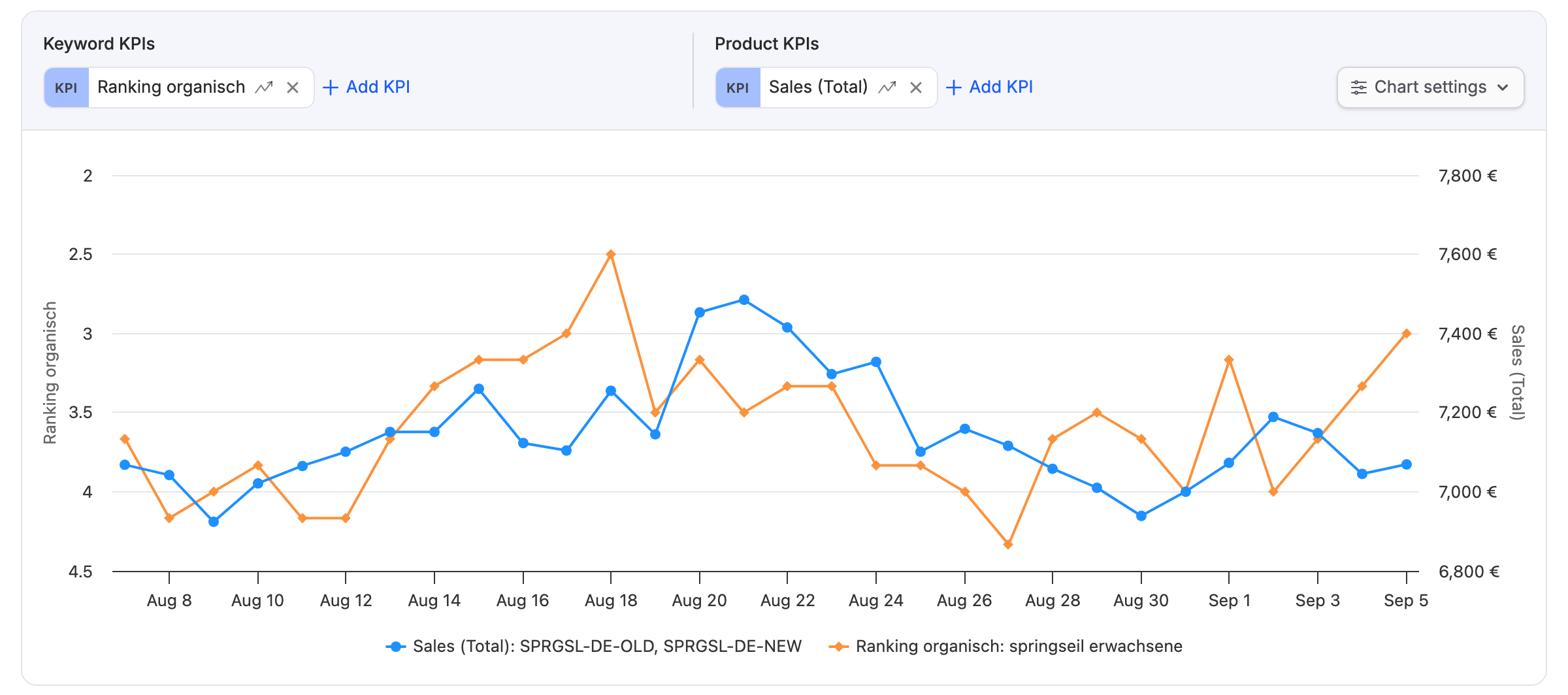 In sellerfox, a keyword's organic rank and the product's sales share one chart.
Data Dive
According to the provider, Data Dive is for validating, launching and optimizing brands for Amazon. According to the provider, Data Dive lets you build listings that get indexed for important keywords from the start, and you find problems in existing listings.11 Rank Radar tracks keyword rankings with daily updates, combines organic rank with PPC data and also tracks individual variations of a product.12 AI Copywriter writes keyword-rich titles, bullet points and descriptions and shows the draft next to your current listing before you publish.13
SellerApp
According to the provider, the SellerApp keyword research tool finds search terms for your listing and shows metrics such as search volume, match type and relevancy. The Reverse ASIN tool shows estimated search volume and rankings of up to four ASINs in one search.14 Keyword Tracker follows the organic ranking of your keywords over time, checks whether your products are indexed for important keywords and tracks rankings for competitors' keywords.15 The listing analysis finds errors and weaknesses in the listing copy and gives recommendations based on Amazon's listing best practices.16
Analytics and profit tools
Once you sell, you need your own numbers: profit after all costs, search queries compared with the market, and alerts when a metric changes unusually. Our guide Amazon FBA profit margin shows how to calculate profit.
sellerfox
sellerfox is the analytics tool for Amazon sellers that we build. You connect your Seller Central account to a sellerfox Workspace and analyze the products you already sell on Amazon.
Profit: Profit Tracking shows your profit after Amazon fees, ad spend and cost of goods. Any other income and expenses you record are included too.
Search queries: Search Term Analyzer compares your products' impressions, clicks, cart adds and purchases per search query with the total market. This requires Amazon Search Query Performance (SQPR) data for your branded products.
Automation: KPI alerts check your conditions daily. Recurring PDF reports carry your own logo, and webhooks send selected metrics to other systems automatically each day.
AI: Through the sellerfox MCP server, you ask Claude, ChatGPT or another compatible AI assistant questions about the product, profit, ranking and search query data in your Workspace. The AI assistant cannot change the data.
Team and agency: Each Workspace connects to one Seller Central account in one Amazon selling region and can cover several marketplaces in that region, such as DE, IT and FR in Europe. Switch between client Workspaces with one sellerfox account and assign Owner, Admin, Viewer and External roles within each Workspace. Learn more on the agencies page.
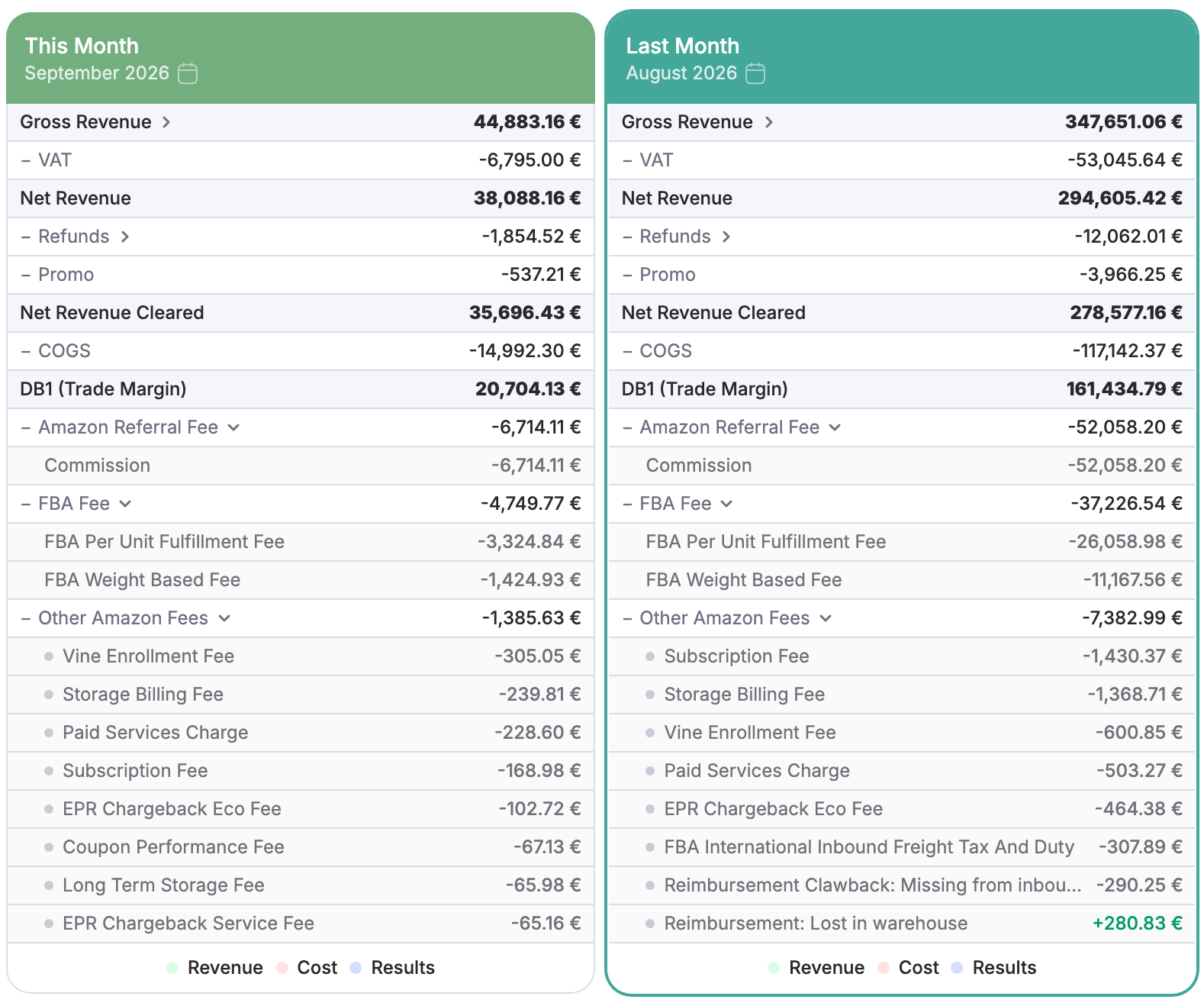 Profit Tracking shows which Amazon fees come off your revenue, broken down by fee type.
Plan: The sellerfox Standard Plan has a base fee per Workspace. The plan includes all features, any number of team members, 2,500 product slots and 100 credits; add more slots and credits as needed. Your revenue and order count do not change the price. Current prices are on the pricing page.
Good fit for: you, if you already sell on Amazon and want to analyze profit, rankings, search queries and listing changes of your products regularly. Vendor analytics are not part of sellerfox.
AMALYTIX
AMALYTIX describes the Seller Tool as a daily check of Account Health, FBA inventory and listings that flags changes and helps you get to the fix. According to the seller page, AMALYTIX shows what remains after Amazon fees, PPC and cost of goods, by product, brand, category or marketplace.17 AMALYTIX routes alerts by your own rules, for example by email, Slack or MS Teams. The price depends on catalog size.18 For vendors, AMALYTIX offers a separate Vendor Tool.19 Detailed comparison: sellerfox vs. AMALYTIX.
My Real Profit
My Real Profit describes an analytics platform for Amazon sellers with dashboards, AI answers and an API, all based on the same reconciled numbers.20 According to the provider, the Profit Dashboard shows all fees and profit by account and ASIN.21 The Search Query Performance report compares your keyword-level market share with competitors, with funnel and PPC data on the same row.22 According to the pricing page, the price depends on the plan and your monthly Amazon revenue across all connected marketplaces.23
sellerboard
sellerboard names "Profit Analytics und Controlling für Amazon-Verkäufer" (profit analytics and financial controlling for Amazon sellers) as the focus. The profit dashboard shows sales, orders, refunds, ad spend, estimated payouts and net profit; purchase prices can be calculated with FIFO.24 The search term analysis uses Amazon Brand Analytics data and shows orders, revenue and profit per search term.25 The plan depends on orders per month, seller accounts and users, among other allowances.26 Detailed comparison: sellerfox vs. sellerboard.
If you want to compare analytics tools in more depth: AMALYTIX, Helium 10, Jungle Scout and sellerboard each have a detailed comparison with sellerfox. Find all comparisons in the comparison overview.
Inventory, replenishment and reimbursement tools
This section covers two tasks: planning and restocking FBA inventory, and claiming reimbursements from Amazon for lost or damaged inventory. Inventory management and reimbursement claims are not part of sellerfox.
Getida
According to Getida, the company's sole focus is Amazon FBA reimbursements, and a team files the reimbursement claims for you.27 According to the provider, Getida first audits the past 18 months of FBA transactions and then continues on an ongoing basis, for example for lost, damaged or destroyed inventory, issues with FBA inbound shipments and potential overcharges related to product weights.28
SELLERLOGIC Lost & Found
According to the provider, SELLERLOGIC Lost & Found automatically analyzes all FBA transactions and shows your reimbursement claims. With the Full-Service, SELLERLOGIC handles the entire reimbursement process, from finding errors to filing claims and communicating with Amazon. Lost & Found checks up to 18 months of FBA transaction history, and according to the provider, a commission is charged only on success.29
VentoryOne
According to the provider, VentoryOne automates inventory management from the order with the supplier to Amazon's warehouses. VentoryOne forecasts your sales, reorders on time and creates FBA shipments.30 With MoneyBack, VentoryOne looks for FBA errors such as lost inventory or excessive FBA fees; a team opens the cases with Amazon. VentoryOne charges a commission on the reimbursed amounts.31
Advertising and PPC tools
PPC tools manage your ad campaigns on Amazon: bids, keywords and budgets. PPC bid management is not part of sellerfox. Our guide to ACOS and TACoS explains the metrics that matter.
BidX
According to the provider, BidX covers Amazon Sponsored Ads, Amazon DSP and Walmart Sponsored Ads in one platform. You create campaign structures in a few clicks, and BidX syncs the campaigns with your Amazon account. An algorithm adjusts keyword bids daily.32 According to the pricing page, the price consists of a monthly base fee and a share of the connected ad spend; plans run annually with monthly payments.33
Perpetua
Perpetua describes software to create, automate and optimize PPC advertising on Amazon. According to the provider, you decide how Perpetua adds new keywords: fully automated, after a set number of conversions or only after your approval. For strategic targets, you set fixed bids or bid multipliers, and Perpetua measures Share of Voice across search terms.34
PPC-Butler
According to the provider, PPC-Butler runs exactly the rules you set, on a schedule from hourly to yearly. Before every bid change, a simulation shows what will happen; every change stays traceable and can be undone with one click.35 According to the pricing page, the plans are Seller, Agentur / Freelancer and Enterprise, and ad spend is unlimited in all three plans.36
Teikametrics
Teikametrics describes ARI Ads as an AI-powered advertising module that allocates budget across Amazon Sponsored Ads, Amazon DSP, Walmart Connect and TikTok Shop based on profit contribution. According to the provider, the bid strategy factors in margin, inventory levels, seasonality, forecasting and competitive position.37 According to the pricing page, the plans depend on monthly ad spend.38
Repricing tools
A repricer adjusts the prices of your offers automatically, for example to win the Buy Box without dropping below your minimum price. Repricing is not part of sellerfox. Our guide to the Amazon Buy Box explains how Amazon awards the Buy Box.
Aura
Aura describes an AI-powered repricer for Amazon and Walmart. You set a minimum price and pick an AI strategy; Aura then runs your pricing around the clock. A log shows every price change with the reason.39 According to the pricing page, the plans differ by monthly sales, number of marketplaces and users.40
BQool
BQool names three kinds of repricing: AI strategies that adjust prices to market conditions in real time, conditional repricing that switches rules based on sales, stock and other conditions, and custom rules for which you choose the competitors.41 According to the pricing page, you buy marketplaces separately, with DE, ES, FR, IT and UK counting as one marketplace.42
SELLERLOGIC Repricer
According to the provider, the SELLERLOGIC Repricer adjusts the prices of all your SKUs automatically. According to the provider, the goal is to win the Buy Box with an item and sell there at the highest possible price, not the lowest. A B2B feature also optimizes your offers for business customers.43
Accounting and tax tools
Specialized providers handle invoices, VAT and bookkeeping. Some deliver software, others also provide accountants or tax advisors.
Amainvoice
According to the provider, Amainvoice creates invoices and credit notes automatically and uploads the invoices to Seller Central, so your customers can download the invoices there. Pro forma invoices are created automatically from the transfer list, and a monthly overview collects all invoices and credit notes for your bookkeeping and tax advisor.44 According to the pricing page, the price depends on the number of documents per month.45
hellotax
According to the provider, hellotax handles VAT filings for Amazon sellers with inventory in several EU countries, for example in the Pan-EU program. Tax advisors at hellotax file the returns in every storage country, and hellotax reads sales, storage locations and inventory movements through the Amazon API.46 According to the pricing page, there are packages per country and a separate package for the One-Stop-Shop (OSS).47
Taxdoo
According to the provider, Taxdoo combines AI-powered software with accountants who specialize in e-commerce for financial accounting; payroll is available as an add-on, and a partner firm handles the annual financial statements and advice.48 Through the Amazon interface, Taxdoo imports all Amazon transactions automatically, analyzes the sales for VAT, for example for warehouses used under FBA, and provides files for OSS returns. A DATEV add-on adds a DATEV-compatible export.49
Frequently asked questions about Amazon seller tools
What is the best tool for Amazon sellers?
This overview contains no ranking. Which tool fits you depends on the task: product research, keywords, profit calculation, inventory, advertising, repricing or accounting. You can use several tools side by side for these tasks. Check the criteria above with your own products.
Can I use several Amazon seller tools at the same time?
Yes. For example, you can use one tool for product research, one for advertising and one to analyze the products you already sell. All tools connected to the same Seller Central account share Amazon's request capacity. Try sellerfox free for 30 days without a credit card while your other tools keep running. After you connect, sellerfox loads up to 2 years of Sales & Traffic data and 6 months of order data; when other tools are connected, this initial load can take longer. Details are in the Data refresh schedule guide.
Which Amazon seller tools connect to Claude or ChatGPT?
Several tools in this overview describe MCP access, with different conditions; check access and plan with each provider. Some examples: with sellerfox, the MCP server is included in the Standard Plan and has read-only access. AMALYTIX offers the MCP server from the Professional plans50, Data Dive on the Standard and Enterprise plans51. My Real Profit and sellerboard describe the access as read-only52, 53. Our article Connect Amazon Seller Central to Claude and ChatGPT shows how an AI assistant works with Seller Central data.
What do the prices of Amazon seller tools depend on?
We do not cite other providers' prices. The pricing models differ: My Real Profit pricing depends on the plan and monthly Amazon revenue23, BidX pricing on a base fee and a share of ad spend33, Amainvoice pricing on the number of documents45, AMALYTIX pricing on catalog size18 and sellerboard plans on orders per month, among other allowances26. SELLERLOGIC Lost & Found and VentoryOne MoneyBack charge a commission only on success29, 31. With sellerfox, you pay a base fee per Workspace and add product slots and credits as needed; revenue and order count do not change the price.
Conclusion: the right tool for every task
For product research, AMZScout, Helium 10, Jungle Scout and SmartScout describe dedicated features, and for the price history of Amazon products, Keepa does. Inventory, advertising, repricing and accounting have specialized providers. sellerfox analyzes the products you already sell: profit, daily keyword rankings, search queries against the total market, listing changes next to sales and sessions, and the history of your Best Seller Rank (BSR). Check the criteria above before you decide, and test with your own products.
Ready to analyze your products? Connect your Seller Central account and see profit, rankings and listing changes for your products in one Workspace. Try sellerfox free for 30 days.
Sources for provider details (checked on October 30, 2026):
https://amzscout.net/
https://www.helium10.com/tools/
https://kb.helium10.com/hc/en-us/articles/6710274045339-Black-Box-Product-Tab-Overview
https://kb.helium10.com/hc/en-us/articles/360048281774-How-Do-I-Set-Up-and-Navigate-Xray
https://www.junglescout.com/products/catalyst/
https://support.junglescout.com/hc/en-us/articles/37123724151319-Choosing-the-Right-Jungle-Scout-Platform-Catalyst-Cobalt-MCP
https://www.junglescout.com/features/product-database/
https://www.smartscout.com/product-research
https://www.smartscout.com/features
https://chromewebstore.google.com/detail/keepa-amazon-price-tracke/neebplgakaahbhdphmkckjjcegoiijjo
https://datadive.tools/
https://support.datadive.tools/hc/en-us/articles/34689663975705-Rank-Radar
https://datadive.tools/ai-copywriter/
https://www.sellerapp.com/amazon-keyword-research.html
https://www.sellerapp.com/amazon-keyword-tracker.html
https://www.sellerapp.com/amazon-listing-quality.html
https://www.amalytix.com/en/amazon-seller-tool/
https://www.amalytix.com/amazon-seller-tool/
https://www.amalytix.com/amazon-vendor-tool/
https://myrealprofit.com/
https://myrealprofit.com/profit-dashboard/
https://myrealprofit.com/amazon-search-query-performance/
https://myrealprofit.com/pricing/
https://sellerboard.com/de
https://sellerboard.com/de/search-terms
https://sellerboard.com/de#pricing
https://getida.com/
https://getida.com/how-we-help/
https://www.sellerlogic.com/de/amazon-lost-found/
https://ventory.one/
https://ventory.one/moneyback/
https://www.bidx.io/de/solutions/amazon-sponsored-ads
https://www.bidx.io/de/pricing
https://perpetua.io/amazon-ppc-software-sponsored-ads-management-tool/
https://ppc-butler.com/
https://ppc-butler.com/preise/
https://www.teikametrics.com/ari-ads/
https://www.teikametrics.com/pricing/
https://goaura.com/
https://goaura.com/pricing
https://www.bqool.com/repricing/
https://www.bqool.com/price/repricing-central/
https://www.sellerlogic.com/de/amazon-repricing-tool/
https://www.amainvoice.de/solutions/amazon-rechnungen
https://www.amainvoice.de/preise
https://hellotax.com/de/amazon-pan-eu-umsatzsteuer
https://hellotax.com/de/preise
https://www.taxdoo.com/de/
https://www.taxdoo.com/de/schnittstellen/amazon/
https://www.amalytix.com/en/amazon-mcp-server/
https://support.datadive.tools/hc/en-us/articles/21020898217625-Data-Dive-API-MCP-How-to-Create-an-API-Key-and-Connect-AI-Tools
https://myrealprofit.com/amazon-mcp-server/
https://sellerboard.com/mcp
Report an outdated statement: support@sellerfox.com